During the Sheffield Games Market, which took place at Ponds Forge Leisure Centre in Sheffield on Saturday 3rd August 2025, I was able to meet the G’AIM’E Team and go hands on with the upcoming TIME CRISIS Gun Controller Set. I’ve already shared my initial reactions on social media, but I thought i’d go in to more detail here to highlight what the product is and to share my experiences with it.
What exactly is the G’AIM’E Time Crisis Gun Controller Set?
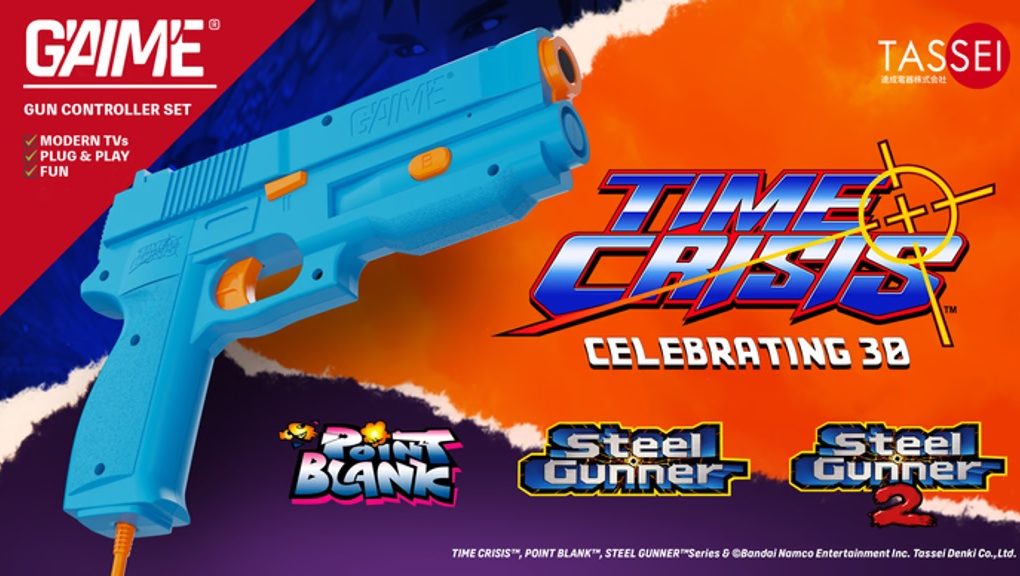
Basically it is a Light Gun and Console Box that plugs in to your HDTV and allows you (for the basic package) to play the arcade version of TIME CRISIS on any modern TV. The basic package with TIME CRISIS is priced at around £100, but alternative packages, which contains arcade versions of TIME CRISIS, POINT BLANK, STEEL GUNNER and STEEL GUNNER 2, are also available and priced at around £150. Only the Premium and Ultimate packages include a foot pedal (for use with TIME CRISIS), but all packages have a light gun with vibration (recoil) functionality.
At the moment these products are only being offered through a Kickstarter campaign, which achieved it’s £35,000 target within 10 minutes of starting, and are expected to ship in late 2025. I’ve been told that a general retail release is expected in the future. Of course, those that do support the Kickstarter campaign, will not only receive the final product sooner, but they will also receive exclusive bonus items, such as a Kickstarter Exclusive themed key chain.
Until now, the only way to play these Arcade games was either via emulation with a Sinden light gun or the TIME CRISIS Arcade1Up Deluxe Cabinet, both of which can be quite costly. This Light Gun Controller set meanwhile looks to fill that void, and make it accessible for everyone to experience (or re-experience) these arcade classics in the comfort of their own home on a modern TV screen.
So, is the TIME CRISIS Gun Controller Set real?:
Kickstarter projects tend to have an air of mystery around them, even with regular updates, but that isn’t the case with G’AIM’E and this TIME CRISIS Gun Controller Set. The product is real, and the team, who are currently demonstrating the product at various events in the UK and America, are very open about what they are wanting to achieve. At the Sheffield Games Market I was not only lucky enough to get hands on with the light gun, but I was even lucky enough to hold the console box (it’s tiny) to see what it is like.
The Console Box:
The console box is around the same size as a PAL PlayStation game case, and has the TIME CRISIS and G’AIM’E logos embedded on top with some grooves to the left of it. These grooves might seem like a strange design choice, but I was told that these grooves have been designed to mimic the grey part of the PlayStation game case where the PlayStation logo would have been. It’s not something I picked up on at first glance, but when comparing side-by-side it does become more noticeable.
On the front of the console box are two USB-C Ports (for the Light Guns/Pedal), a Power Button and a Reset Button. The back of the box meanwhile only has a USB-C Port (for the Power) and a HDMI output. It’s simple, stylish and small, and kind of reminds me of other portable game devices (such as the NES Mini or PlayStation Classic).
The Light Gun & Pedal:
Depending on where you are based will depend on which colour light gun you will receive, as Japan will receive a Black and Orange light gun while the rest of the world will receive the Blue and Orange light gun. Personally I prefer the Blue & Orange light gun, as it replicates the colours used on the original Arcade Cabinet for TIME CRISIS and POINT BLANK, but regardless, both light guns are the same.
Those familiar with PS1 light guns will notice that this light gun design closely resembles that of the Gcon-45 (or GunCon in Japan), which in itself was adapted from the guns used on NAMCO Arcade machines, and on it you’ll find both the G’AIM’E and TIME CRISIS logos engraved on both sides. Additionally, on both sides of the light gun you’ll find several buttons, each serving an important purpose (which I’ll explain below).
The style of the light gun is very nostalgic, but more importantly it feels very comfortable to use – especially the trigger button which was very responsive in game on both TIME CRISIS and POINT BLANK. Instead of creating an entirely new light gun design, it seems G’AIM’E have adapted the iconic G-Con45 design to their their needs. It shows, as it looks and feels great. That’s not all, as the plastic being used for the light gun has a rather premium quality feel to it, unlike the TIME CRISIS Arcade1Up cabinet which (while nice) feels a bit too plastic and safe.
Trigger Button:
While the light gun has many buttons it is the trigger button that is going to be used the most, and I’m happy to say that the trigger button felt very responsive and does not have much resistance. You can also press the trigger button multiple times in quick succession and the shots will be registered (both on screen and the guns vibration), which is especially useful in POINT BLANK during those fast-shooting challenges.
Left Side:
The left side of the light gun has two main buttons, and a switch, all of which are orange so that they stand out more.
A Button: This button can be used as an alternative to the foot pedal in TIME CRISIS as well as to navigate menus and start games after inserting a credit.
Insert Coin Button: This button is used to insert credits (coins) for the game that you are playing. One button press is one credit, and until a credit is entered the game will continue its attract mode sequence.
Recoil on/off switch: This is a slider switch that enables and disables the recoil function. Sadly recoil is just vibration, so there is no pump action on the slider, but the vibration isn’t weak. The recoil is not as strong as the recoil on a Sinden Lightgun (which can be adjusted), but it is strong enough to have a sense of shooting and doesn’t make too much noise.
Right Side:
The right side of the light gun has two buttons, and once again these buttons are orange so that they stand-out in darker environments.
B Button: I believe this button can be used to back out of menus in the main menu.
Pause Button: This is used to pause the game. Pausing the game will also bring up other options, such as calibration and option to exit the game.
Pedal:
Ironically I didn’t see the pedal much, mostly because my foot was placed on it during TIME CRISIS, but it is a small black box with (I think) a metal plate that you place your foot on. The pedal is mostly used in TIME CRISIS, where you’ll push down on the pedal to pop up out of hiding, but it can be used to activate credits you’ve entered in TIME CRISIS. The Pedal does look bigger, and stronger material, than what is being used on the TIME CRISIS Arcade1Up Cabinet, and also has rubber feet on the bottom to stop it moving on flat surfaces. I didn’t notice the pedal moving that much (if at all), which is great as the pedal on the TIME CRISIS Arcade1Up Cabinet moves relatively easily due to the lack of weight in it.
Thoughts on the Light Gun:
Overall I found the Light Gun to be extremely comfortable and easy to use, especially when compared to Sinden Light Gun and the TIME CRISIS Arcade1Up Cabinet as it is much more ergonomic. To me the Recoil version of the Sinden Light Gun is quite heavy, so using it for long periods of time can be quite tiresome. I also find the Trigger on the Sinden Light Gun to be a little bit uncomfortable after some extended sessions. The TIME CRISIS Arcade1Up Cabinet meanwhile has relatively light weight guns, which is good, but the Trigger button is tied to the mechanism of the recoil function, meaning there is quite a bit of resistance when pulling the trigger so shots may feel delayed or difficult to pull off in quick succession.
With this TIME CRISIS Gun Controller Set however I had none of these issues during my session, and I found it to be a nice balance of weight and trigger resistance. Perhaps it is nostalgia for the G-Con45 and NAMCO Arcade light gun designs, but to me this was really comfortable to use. The only downside is the lack of a proper recoil. To the casual player the vibration in the light gun is sufficient, but for those looking for that perfect arcade experience at home then you’ll feel like something is missing. Of course, majority of the light guns released on consoles didn’t have proper recoil functions either (other than the Logic3 P99L) so to have any type of recoil (even vibration) is good enough for something like this which is realistically going to be used for home casual gaming.
Calibration, does it really have no border on screen?
That’s correct, and after initial calibration you’ll play the games as if you were playing them on a CRT TV with no visual restrictions on screen. So how does calibration work? Well during first boot up you’ll be welcomed with a tutorial that informs you on how to calibrate the light gun. Depending on the TV size will depend on the distance you need to be away from the TV, with 2m – 3m being the norm for 50″ screens. Standing back at a distance isn’t anything new, as this was also needed for Sinden Light Guns and on PS3 with the GunCon3 (I also believe this is why TIME CRISIS Arcade1Up Cabinet uses a smaller screen so that you do not have to stand too far from the unit).
Once you’ve stood at the suggested distance you’ll then move on to the light gun calibration, and this is done by shooting three times at nine targets on screen. It might not look like it at the time, but the screen is being split into nine different sections (3 sections on top, 3 sections on middle, and 3 sections on bottom) and each shot is teaching the software (and hardware) where you are pointing at on screen. Once finished you’ll have the option to re-calibrate, or be taken to the main menu of the console. Calibration takes longer than your typical PS1/PS2 set-up screen, but it is needed in order to be accurate, and while it does take slightly longer it is a simple process.
The games! What about the games?
With calibration done it is now time to enjoy the games on offer. The main menu has, realistically, two options. The games and settings. I didn’t explore the settings menu, but you’ll be able to re-calibrate the light gun from within this option. The games meanwhile all appear on a single page and are split into four boxes, each with their own logo and visual. All you need to do is shoot the relevant game, and it will instantly boot-up and begin displaying that games attract mode sequence.
For those unfamiliar with arcade terminology, attract mode refers to the games rolling demo where it shows you how to play the game, examples of its gameplay, and high-scores before landing on the title screen. For TIME CRISIS you’ll also get two different story sequences. They are called “attract modes” as they are intended to attract customers to the arcade cabinet.
TIME CRISIS:
During my session I played Stage 1 of TIME CRISIS, as well as two-player in POINT BLANK. Naturally TIME CRISIS was the game I played first and I switched between the foot pedal, and the A button on the side of the light gun, for movement. As soon as I started playing TIME CRISIS I felt like I was playing the game on a regular CRT screen. The response time from pulling the trigger to hitting the screen was faster than expected, and felt more in line with how light guns worked on CRT screens. Of course I missed a few shots, or some went wide, but unlike my first attempts on a Sinden Light Gun or TIME CRISIS Arcade1Up I was hitting more targets than was missing them, and had confidence in where I was aiming.
At the end of the first area, which I did in 1 minute 5 seconds, I was told that the hardware and software being used to calibrate the light gun was still in development and should get better. Even in this “under development stage” it felt pretty accurate, especially when I considered the environment the game was being played in. The room used had sunlight shining on the TV screen, and the TV was hung on a wall quite high at a good distance from where I was stood. This wasn’t some dark room with a bright screen, this was a real world environment, and the light gun worked very well.
Carrying on with TIME CRISIS I played the same way I always do, and everything felt natural to me. No hesitation, no second-guessing of shots, the targets I wanted to hit were (mostly) hit. Of course there were misses, but my next shot would usually hit its mark. The light gun was working as I hoped it would, but as with any new device, or in this case light gun, you need time to get used to how it works and this is something I was doing with the Foot Pedal.
The Foot Pedal works well with TIME CRISIS, but I hadn’t built up confidence with it, and so I switched to pressing the A button. I think it is because it felt like I needed to push down at the top of the pedal rather than at the bottom of it, which is what I do at the Arcades. That aside, both foot pedal and pressing the A button offered similar results, where I could release and quickly hide without getting hit… unlike Time Crisis 5 where the reactions of releasing the pedal seem slow. Different game I know, but timing is crucial in this game.
POINT BLANK:
POINT BLANK is a game that (realistically) requires point blank accuracy (no pun intended) and is a great test for knowing whether the gun has been calibrated well. Surprisingly I tried 2 Player with another player and found myself, rather comically, completing some of the hardest stages in the game with ease. Shoot 3 Balls with 1 Bullet. DONE. Shoot the Apple with 1 Bullet. Easy. Shoot the Spaceship with 1 Bullet. BOOM. I was amazed that I was able to hit these each time, and it gets better.
Due to the quality design of the light gun you can easily pull the trigger quickly to shoot faster. Which is ideal for stages that require you to shoot quickly, such as the VERY HARD stages or the Destroy the Car challenge. It makes sense that pulling the trigger quicker will result in more bullets fired, but some light gun designs make it difficult (or uncomfortable) to do so, but I didn’t find this to be an issue here. I could be as trigger happy as I wanted, and the game would recognize the hits.
Additionally, even with two light guns connected and playing at once there was no noticeable input delay, every shot felt like it was (mostly) hitting its mark when pulling the trigger. Just as it would on a CRT TV screen. Even fast-paced challenges, such as shooting the piranha swimming across the screen, felt like I was hitting targets. With the Sinden, or the TIME CRISIS Arcade1Up cabinet, it sometimes felt as if the game was trying to catch up with your movement, but it didn’t feel like this during my time with this unit.
Final Thoughts:
I was expecting the G’AIM’E TIME CRISIS Gun Controller Set to play similarly to the Sinden Light Gun or the TIME CRISIS Deluxe Arcade1Up Cabinet, where there would be some kind of input delay or border on screen, but instead I think it delivers something a little bit better. Even at this point in development the accuracy of the light gun is up there with the Sinden Light Gun, but it doesn’t require any intrusive borders on your screen. The quality and design of this Light Gun is much more comfortable and easier to handle as well.
Overall it is accurate, simple to use, and a quality product, and will most likely be the best way to experience TIME CRISIS and POINT BLANK in your home without breaking the bank on an emulated arcade set up or a TIME CRISIS Deluxe Arcade1Up Cabinet, and I’m looking forward to seeing the final product.
The G’AIM’E Time Crisis Gun Controller Set is currently available as a Kickstarter campaign until 23rd August 2025, where different packages for the device are available. G’AIM’E are aiming o ship the final product to backers in late 2025 /early 2026 with a general retail release expected in the future.